We use cookies to make your experience better. To comply with the new e-Privacy directive, we need to ask for your consent to set the cookies. Learn more.

TCAS Trainer for X-Plane 12
As low as €14.99
In stock
SKU
XPTCAS
Build realistic, repeatable TCAS encounters in X-Plane 12. Intruders you place with exact geometry feed X-Plane's own TCAS system, so your aircraft's real TCAS display and aural alerts react. BASIC has one intruder; ADVANCED adds up to eight intruders and an intercept fighter that flies formation on your wing; PROFESSIONAL is ADVANCED licensed for commercial and professional use.
Practice the procedure you hope you never need — on demand, exactly the way you want it.
Most pilots, real and virtual, go years between genuine TCAS Resolution Advisories. That scarcity is the problem: an RA demands an immediate, correct and specific response, and a procedure that is rarely exercised is the one most likely to be fumbled when it counts. TCAS Trainer closes that gap. It lets you script an exact encounter in X-Plane 12 and fly it as often as you like — the same way every time, or deliberately varied — so the reflexes stay sharp.
How it works
TCAS Trainer creates synthetic traffic around your aircraft and feeds it directly into X-Plane's own TCAS target data. That is the important part: this is not a status window pretending to be TCAS. The traffic appears on your aircraft's real TCAS/ND display, triggers its own Traffic Advisories and Resolution Advisories, and sets off its own aural alerts — "Traffic, traffic", "Climb, climb" — just as the aircraft you fly would show them for real traffic. The add-on never touches your aircraft's autopilot or flight controls: responding to the advisory is entirely up to you, which is the whole point of training.
Three editions
| BASIC | ADVANCED | PROFESSIONAL | |
|---|---|---|---|
| Intruders | 1 | up to 8 | up to 8 |
| Intercept fighter | no | yes | yes |
| License | individual, non-commercial | individual, non-commercial | commercial and professional use |
ADVANCED and PROFESSIONAL have exactly the same features; they differ in the license terms only.
The intruders
BASIC gives you one fully configurable intruder aircraft; ADVANCED and PROFESSIONAL give you up to eight independent intruders. Every intruder has its own page and its own settings, and they can all be active at once: one can pass you head-on while another converges from behind and a third crosses from the right.
- Choose each intruder's aircraft type and livery from your installed CSL models.
- Set exactly where it starts: the initial range, and the bearing at which its path will cross yours. TCAS Trainer solves the geometry backward, so the intruder arrives at the meeting point you asked for, whatever your current speed and heading.
- Set exactly where and how close it passes you: a final position dial for the lateral offset and a slider for the vertical offset (±1,000 ft). Choose any intruder ground speed from 100 to 550 kt, or set the time to encounter instead.
- A collision-proximity indicator turns red and warns "Collision likely" while you configure a geometry that would put the aircraft dangerously close, so you can see at a glance whether an encounter is aggressive.
- The intruder keeps adjusting its speed so that the encounter still happens if you speed up, slow down or change heading after it has spawned.
- Optionally the intruder flies its own Resolution Advisory (climbs or descends at a configurable rate, 0–2,000 fpm), or simply holds its altitude. A TA only mode makes the intruder climb or descend away halfway through the Traffic Advisory band and never reach an RA, which is ideal for practising Traffic Advisory recognition and response on its own.
- A live status line shows range, vertical separation, time to encounter, speed and the current advisory sense.
- Switch on auto-regenerate and each intruder respawns at its starting position shortly after it has passed, so you can repeat the same encounter back-to-back without touching the mouse.
The intercept fighter (ADVANCED and PROFESSIONAL only)
The intercept fighter is not part of BASIC.
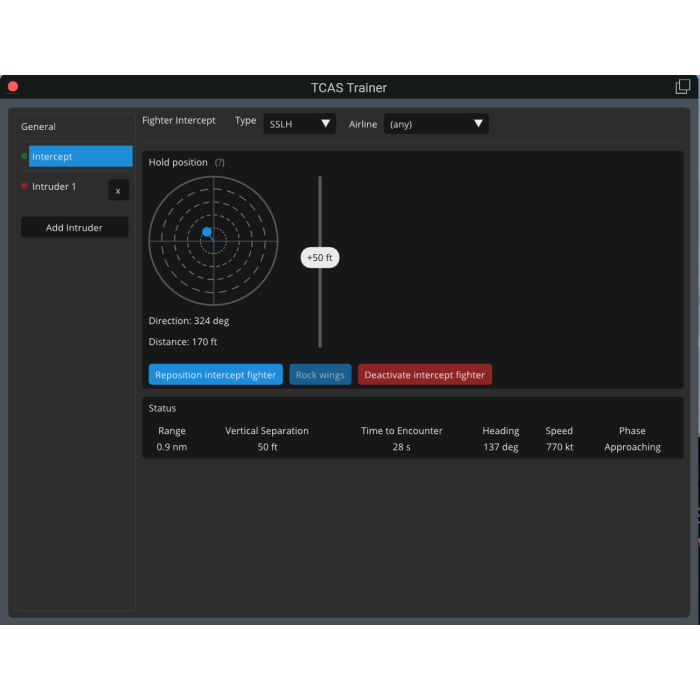
The intercept fighter is a second, independent feature, and it is the one people grin at. A single aircraft of your choice — a fighter jet, an airliner, or the Santa Claus sleigh — comes up from behind, closes on you, and settles into a tight formation off your wing, then keeps station until you send it away.
- The approach. The fighter appears behind you, timed to close in roughly 30 seconds. It starts out at about twice your speed and steers toward its station, and as it gets closer it eases off, finishing with only a small speed advantage so that it slides into position instead of overshooting. Its turns, climbs and speed changes are all rate-limited, so it flies like an aircraft rather than snapping from point to point.
- The hold position. You decide where it flies: a direction and distance relative to your own track, and an altitude offset above or below you. Put it close off your wingtip, or further back and high.
- The wing rock. Once on station it holds for five seconds and then rocks its wings, rolling left and right twice, before settling into steady formation flight. The Rock wings button (or a command) triggers it again whenever you like.
- The departure. When you deactivate it, the fighter pulls ahead of you, then breaks away in an abrupt climbing turn that never crosses your path, and disappears.
- Safe by design. The fighter needs at least 150 kt groundspeed and 200 ft above ground to activate, and it departs by itself if you drop below those limits — a go-around or a landing approach will not leave you with a jet hanging on your wing. It never takes part in TCAS, so however close it holds, it will not trigger an advisory.
- Always under your control. Activate, reposition (fly a fresh approach to the current hold position) and deactivate it from the configuration window, or from commands you can bind to a joystick button or a keyboard shortcut.
Use it to practise what to do when another aircraft joins up with you, to build a scenario for a training session, or simply to fly formation and take screenshots.
Configure it, script it, repeat it
- A single configuration window with a page for each intruder, one for the intercept fighter (ADVANCED and PROFESSIONAL) and one for general settings. Everything you configure is saved and restored the next session. (Intruders and the fighter always start deactivated, so a saved encounter never appears behind your back.)
- Commands and datarefs for every control and every status value: trigger encounters from a hardware panel, from another plugin or from a scripted scenario, and read the live state back.
- TCAS Trainer has been tested with the Zibo 737 and the ToLiss A320. The advisories are generated by your aircraft's own TCAS implementation, so TCAS support — and what you see on your PFD and ND — depends on the aircraft and its version.
- Works on multi-computer setups: external visual computers running the XPMP2 Remote Client draw the same traffic.
Using it alongside LiveTraffic, xPilot and other live traffic plugins
TCAS Trainer coexists with other plugins that draw aircraft, such as LiveTraffic or an online-network client like xPilot. They all use the same multiplayer-aircraft library, so their aircraft are drawn side by side without conflict.
There is one limit, and it comes from X-Plane itself: only one plugin at a time can drive X-Plane's TCAS display. TCAS Trainer takes that role only while an intruder or the intercept fighter is active, and gives it back when the last one is deactivated. If another plugin already holds TCAS, TCAS Trainer does not take it away; it says "Waiting for plugin <name> to release TCAS" on every page, asks the other plugin only once, and takes over by itself as soon as TCAS is released. If another plugin asks for TCAS while TCAS Trainer holds it, TCAS Trainer yields instead of taking it straight back.
The documentation explains how to release TCAS in LiveTraffic, xPilot and IVAO Altitude, and how to use the XPMP2 Remote Client on separate visual computers without interference: https://midwestsimulations.com/tcastrainer/manual#running-alongside-other-traffic-plugins
Licensing
One license code per purchase. You exchange the license code on the Midwest Simulations license page for a license file that is tied to your computer — about a minute, with no restart of X-Plane. Each license can be used on up to three of your computers. BASIC and ADVANCED are licensed for individual, non-commercial use by one named person. PROFESSIONAL covers commercial and professional use by named individuals — for training organizations, businesses and anyone else outside the Personal terms — and redistribution is not permitted. Step-by-step instructions, with screenshots, are in the User Guide.
When do you need PROFESSIONAL?
TCAS Trainer follows the rule that Laminar Research sets for X-Plane itself. Laminar Research explains at www.x-plane.com/pro what makes it "X-Plane for professional use". Condition 2 reads:
It licenses your simulator for commercial use (that is, any use of X-Plane outside of your own personal use in your own personal home.) This license is also required for generating revenue, either directly or indirectly, using X-Plane.
If your use of X-Plane requires an X-Plane for professional use license under that condition, TCAS Trainer requires the PROFESSIONAL license as well. This applies, for example, to training organizations, flight schools, businesses, and anyone who uses X-Plane and TCAS Trainer outside their own personal home or to earn revenue, directly or indirectly. If you use TCAS Trainer only for yourself, at home, as a hobby, BASIC or ADVANCED is enough. If you are unsure which one you need, check Laminar Research's current terms at the address above, or contact support@midwestsimulations.com before you buy.
Christmas edition
Purchases made until December 31st include the Santa Claus aircraft, a sleigh pulled by animated reindeer, as a CSL model, so you have an aircraft to draw right away — as an intruder or, in ADVANCED and PROFESSIONAL, as your intercept fighter.
Documentation and support
A full illustrated User Guide, with a step-by-step licensing guide and a dataref and command reference for scripting, is available as the product documentation at https://midwestsimulations.com/tcastrainer/manual. Support, suggestions and bug reports: support@midwestsimulations.com. TCAS Trainer is community-driven: frequently requested features are prioritized for future releases.
Please note
TCAS Trainer is a training aid for procedure practice. It is not a certified TCAS/ACAS unit, it does not use real-world traffic, and its Resolution Advisory logic is a simplified training model. It is not affiliated with Laminar Research.
What is included in each edition
- BASIC: one intruder, fully configurable (aircraft type, livery, range, bearing, passing distance, altitude offset and speed); optional intruder reaction to its own Resolution Advisory, and the TA only mode; collision-proximity warnings, auto-regeneration and live status; commands and datarefs for every control; illustrated User Guide. Not included: additional intruders and the intercept fighter.
- ADVANCED: everything in BASIC, plus up to 8 independent intruders and the intercept fighter with approach, hold position, wing rock and departure.
- PROFESSIONAL: the same features as ADVANCED, with a license for commercial and professional use.