We use cookies to make your experience better. To comply with the new e-Privacy directive, we need to ask for your consent to set the cookies. Learn more.

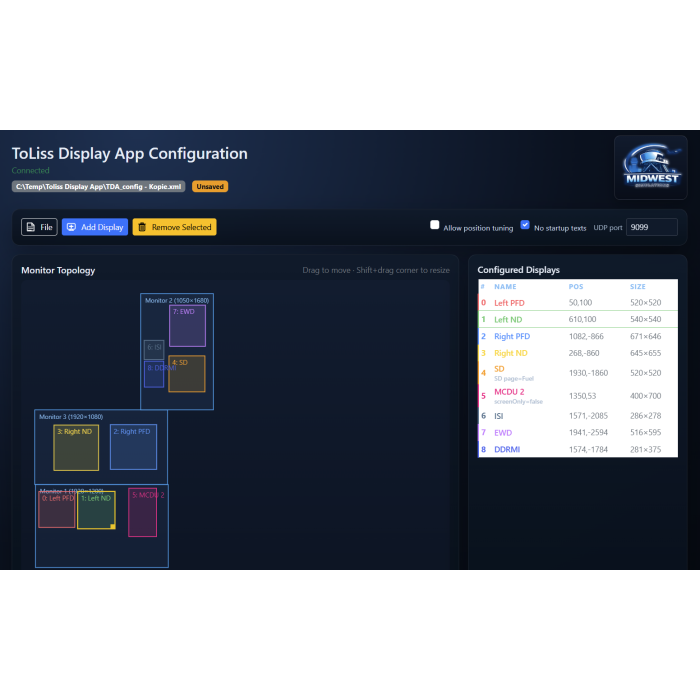
ToLiss Display App Configuration program
€49.00
In stock
SKU
TDACONFIG-WIN
TDA Config is the visual configuration tool for the ToLiss Display App — drag and resize your PFD, ND, EWD, Systems Display, and other instrument windows across your monitors in real time, instead of hand-editing XML and restarting to check your work. Configure from a web browser on any device, start from ready-made templates, and reposition running displays instantly. Free 14-day demo included.
TDA Config for Windows — Stop Hand-Editing XML. Start Placing Displays.
TDA Config is the visual configuration companion for the ToLiss Display App — the tool that lets you build multi-monitor cockpit displays for your ToLiss Airbus without ever opening a text editor.
If you've set up PFDs, EWDs, or a Systems Display across a home cockpit or multi-monitor rig before, you know the drill: hand-editing XML tags, guessing at pixel coordinates, restarting the sim to see if you got it right, and doing it all again when you're off by twenty pixels. TDA Config replaces that entire cycle with a live, visual editor.
Why TDA Config instead of editing XML by hand
- See your monitors, not coordinates. A real-time topology view shows your actual displays as they're physically arranged — drag a window to move it, shift-drag a corner to resize it. No more calculating offsets or discovering a typo only after restarting the app.
- Reposition without restarting. With position tuning enabled, dragging a window and saving repositions the already-running ToLiss Display App instantly — no XML reload, no relaunch.
- All 18 instrument types, correctly, every time. PFD, ND, EWD, Systems Display (with all 16 SD subpages), MCDU, DCDU, DRAIMS, ISI, ISCS, EFB, and more — pick them from a list instead of memorizing index numbers and hoping you didn't fat-finger one.
- Configure from anywhere. A built-in web interface lets you adjust your layout from a tablet, phone, or second PC — useful when your sim PC is tucked inside a cockpit shell you're not sitting at.
- Start in seconds, not sessions. Built-in templates (single-PFD, dual-monitor PFD+EWD, and more) get you a working layout immediately; customize from there instead of writing XML from a blank file.
- Built for multi-monitor rigs. Manage as many displays as your setup has, across as many monitors as you own, from one screen.
- No XML syntax errors. Every configuration you build through TDA Config is valid by construction — the class of bugs that comes from a missing quote or a malformed tag simply doesn't happen.
Try before you buy
TDA Config includes a free, fully-functional 14-day demo license, issued automatically the first time you run it — no account, no key entry, no waiting. When you're ready, a full license unlocks permanent use on your machine.
Available now for Windows. (Linux and Raspberry Pi builds also available.)
IMPORTANT:
Use this Download link for the demo and the final version: https://midwestsimulations.com/tdaconfig/downloads